Data Manager - Removing Unused Data Older Than 7 Years
Introduction
The data manager allows you to select criteria to do a bulk data wipe for accounts where there has been no activity for a given period (normally 7 years).
Removing Unused Data
There are two options.
1) Scrub only.
1) Scrub only.
This wipes the customer data according to the data wipe settings.
2) Scrub and archive.
2) Scrub and archive.
This wipes the data as above but also archives the boat so that it no longer appears in the F2 boat search. (The boat record remains but is not in the active database).
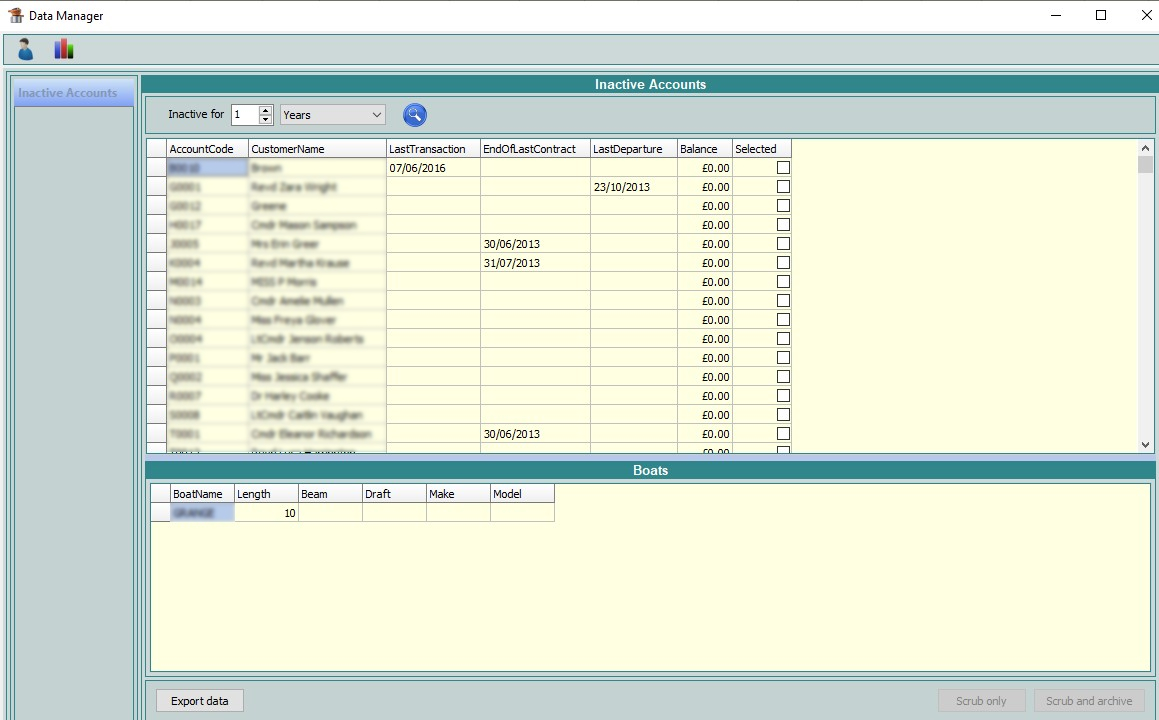
In the example shown above, the inactive period has been set to 1 year. Simply click the blue search icon to return any records which fall within the set criteria.
In the example shown above, the inactive period has been set to 1 year. Simply click the blue search icon to return any records which fall within the set criteria.
There are right-click options to select all, none or highlighted. You can also just tick the boxes manually if you wish.
Once you have the records you wish to deal with selected, you have the option to export the data by clicking Export data on the left-hand side if desired or choose to either scrub or scrub and archive. (Please note that if there is a balance on the account, you will not be able to archive the boat.) You would normally set this year's to 8 in order to remove everything older than 7 years.
At the very top of this screen you will note the 1st icon is selected, if you switch to the second icon, which looks like a graph, you can view marketing preference changes or data wipe audits.
Related Articles
Havenstar Reference Guide V3.1 - GDPR (UK)
Introduction Here, we have attached our full manual on data management and GDPR within Havenstar. To view the manual, select the tab Attachment and you will then see the link to the file. The attachment takes you to the full version of the manual so ...Fuel Manager - Correcting Mistakes
Introduction If you have made a mistake in Fuel Manager, the corrections should be made as soon as possible. Below is a list of possible scenarios that you may encounter, and how to fix. Marina Usage These cannot be edited once posted, but there are ...Bookings Manager (aka Visitor Bookings Manager) - Amending and Deleting Bookings
Introduction In Havenstar, Booking Manager (aka Visitor Bookings Manager) is the module used to manage short stay and visitor bookings within a marina. It allows staff to: Record arrivals and departures for visiting boats Allocate berths for specific ...Fuel Manager - Recording Deliveries
Quick Intro The Fuel Manager Goods Received screen lets you log and track deliveries of fuel that you receive to the marina. You can capture fuel cost, litreage, delivery time, and record the specific tank(s) that received it. This data is then used ...Visitor Bookings Manager - Find an Existing Booking
Quick Intro There are various ways to find an existing visitor booking that you need to administer. This article explains these methods. Where To Find It You can open the Visitor Bookings Manager from the Nav Bar, under the Boats & Berths section. ...